Stop Losing Money on Events You Can't Properly Track
Events are one of the best sales and brand-building channels for craft beverage producers — but they're also one of the easiest places to lose money without realising it. Liquor Logic's event management tools give you complete visibility over every cost, every item of equipment, every litre of product, and every rand of revenue — before, during, and after every event.
Two Powerful Modules. One Event Management System.
Liquor Logic covers both sides of event management — running and tracking events your business attends or hosts, and managing equipment that you rent out to external clients for their events.
Event Planner
Plan events your business attends or hosts — farmers markets, food and wine festivals, trade shows, private tastings, and corporate functions. Define your cost budget, set revenue targets, allocate inventory to travel with, and track actual performance against plan.
Learn MoreEvent Hire
Track equipment you rent out to external customers — bars, tables, gazebos, glassware, tap systems, and any other hireable assets. Manage deposits, track item condition on return, and maintain a live register of what's out and what's available.
Learn MorePlan Every Event Like a Business Decision — Because That's What It Is
Every event you attend or host represents a significant investment of time, money, product, and staff. Liquor Logic's Event Planner forces structure onto that investment — so you always know going in whether an event is viable, and coming out whether it was worth doing again.
Pre-Event Planning & Budgeting
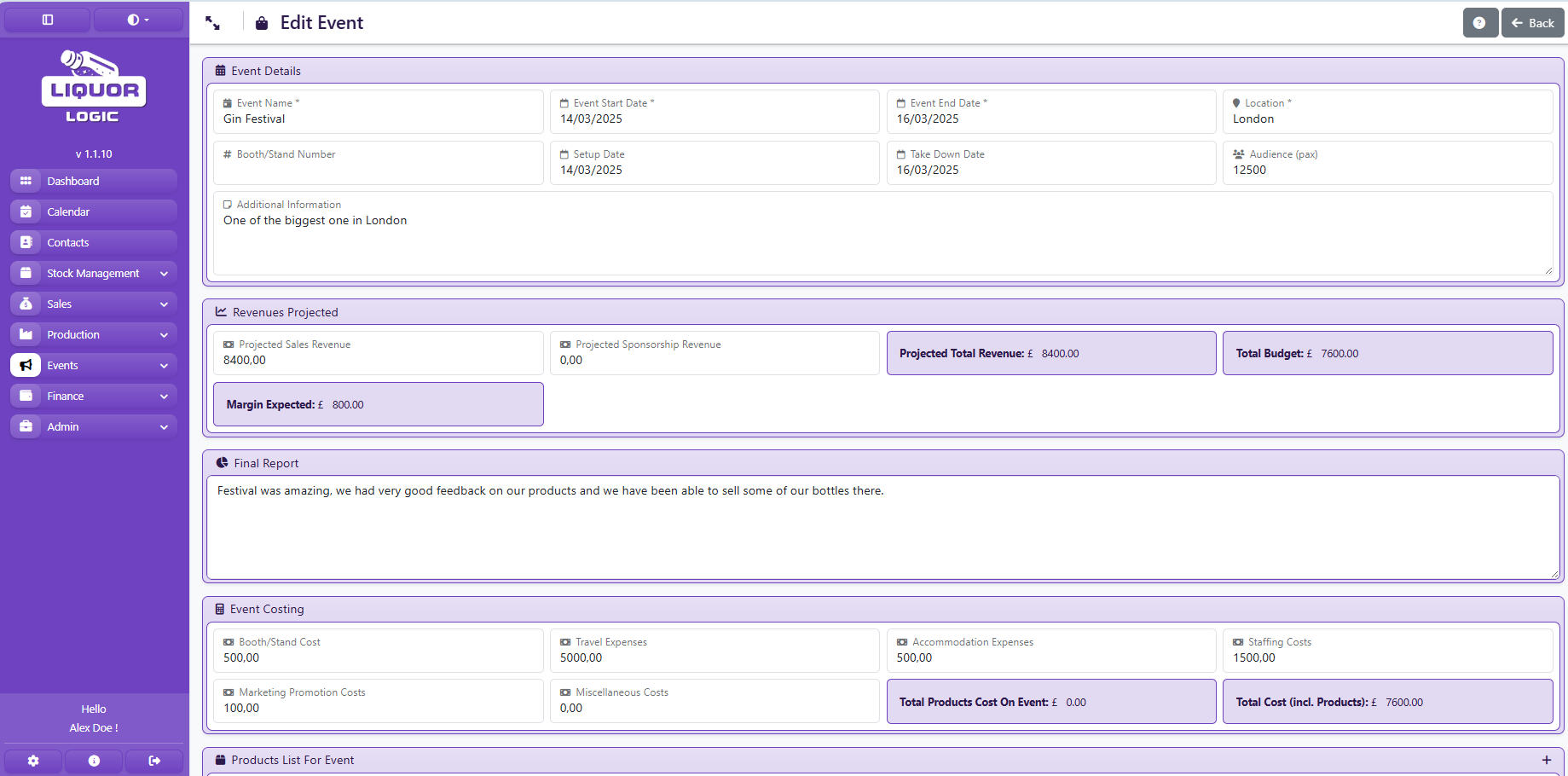
Before you commit to an event, Liquor Logic helps you build a complete financial picture. Log all anticipated costs — stall fees, transport, staff wages, marketing materials, packaging, and any other event-specific expenses. Set your revenue target based on expected footfall and average transaction value.
Add the inventory you plan to take to the event — quantities of each product — and the system calculates the cost of goods you'll be taking, factoring it into your overall event margin calculation. Before you've packed a single box, you know what this event needs to turn over to break even and what it needs to turn over to be genuinely profitable.
- Cost budget builder — stall fees, transport, staff, marketing, and more
- Revenue targets — set expected turnover and track against actuals
- Inventory pack list — define exactly what product to take and in what quantity
- Margin calculation — know your break-even point and profit threshold before you go
- Equipment checklist — log every item of hardware and display equipment to pack
- Staff assignment — allocate staff to the event and include their costs in the budget
Inventory Allocation
Define exactly what goes to the event — quantities of each SKU, plus any raw materials or consumables needed. Stock is reserved from your main inventory while at the event and reconciled back when you return, so your available stock figures are always accurate even while you're away from your production site.
- Reserve stock for event from main inventory
- Track what was sold at the event
- Return unsold stock to main inventory
- Record samples and comps separately
Real-Time Revenue Tracking
During the event, sales recorded through the Liquor Logic POS flow directly into your event's revenue tracker. At any point during the day, you can see how much you've turned over versus your target — and whether you're on track to meet your margin requirement. No waiting until you get home to find out how it went.
- Live revenue vs target dashboard
- Sales by product during the event
- Running margin calculation
- Payment method breakdown
Post-Event Report & Rating
After the event, Liquor Logic generates a comprehensive performance report — final revenue, total costs, net profit, margin percentage, best-selling products, stock returned, and any samples or wastage. An event rating is calculated automatically to help you decide whether to attend again next year.
- Full P&L statement per event
- Cost vs revenue breakdown
- Best and worst selling products
- Automatic event performance rating
Events Your Business Actually Attends
Liquor Logic's Event Planner is flexible enough to handle any type of event your business participates in.
Track Every Piece of Equipment You Rent Out — Without the Spreadsheet
Many breweries, distilleries, and wineries supplement their income by renting out equipment to external customers for their events — mobile bars, beer tap systems, tables, branded glassware, gazebos, refrigeration units, and more. This is a legitimate revenue stream, but it creates operational complexity that most businesses manage poorly.
Which customer has which items? When are they due back? What deposit was collected? Was the equipment returned in good condition or is there damage to account for? Without a system, these questions are answered by memory, WhatsApp messages, and informal notes — which means items get lost, deposits get forgotten, and damage disputes are impossible to resolve fairly.
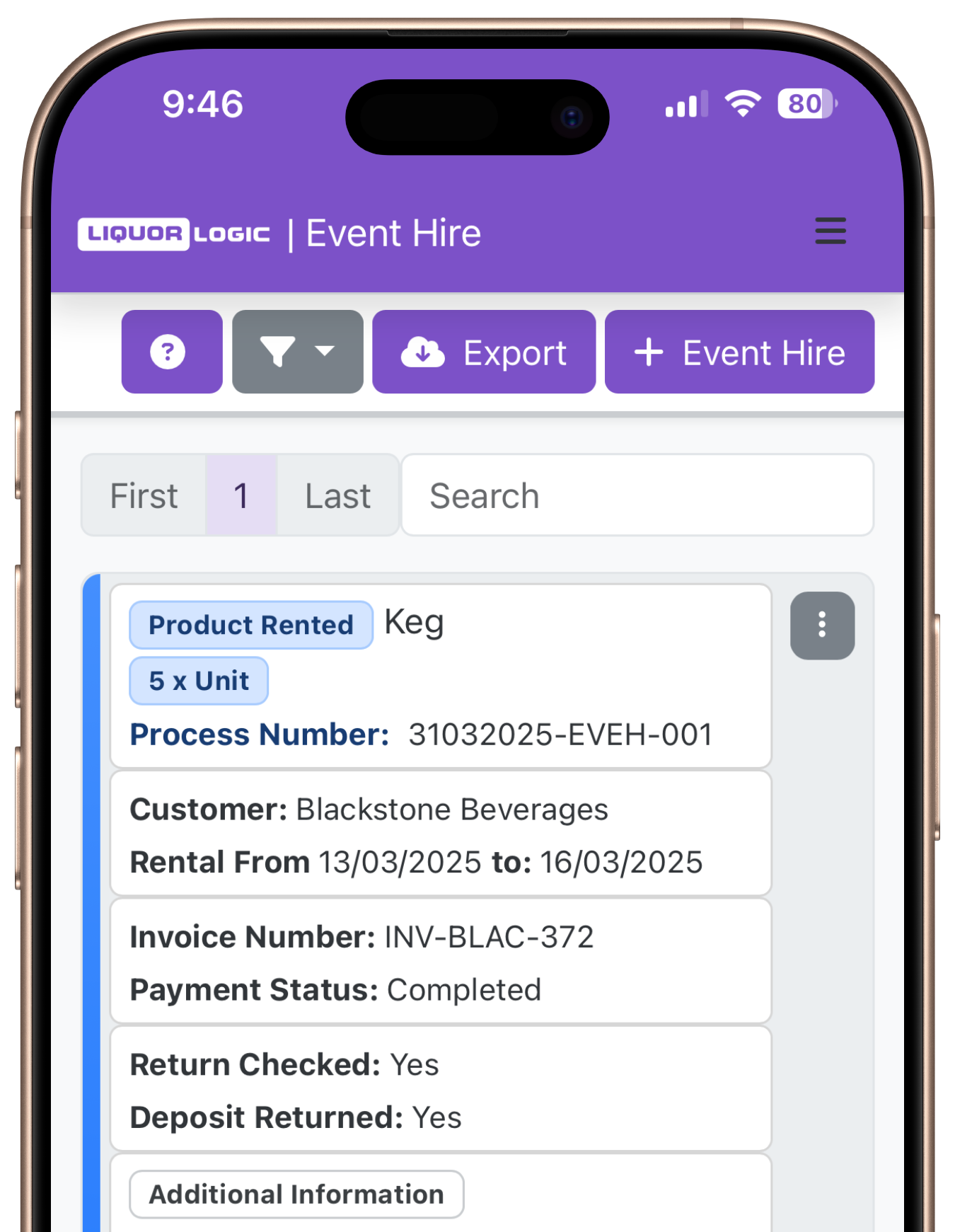
Liquor Logic's Event Hire module gives every hireable item its own record in the system. When a customer hires items, you create a hire record — logging the items, quantities, hire period, and deposit amount. The system tracks the hire status of every item and alerts you when a return is overdue. When items come back, you record their condition and the system manages the deposit refund or retention accordingly.
- Hireable item register — define which inventory items can be hired out and at what rate
- Hire record creation — log customer, items, quantities, hire period, and deposit
- Live hire status — see what's out with which customer and since when at a glance
- Overdue return alerts — flag hires that have exceeded their agreed return date
- Condition check on return — record item condition and any damage when equipment returns
- Deposit management — track held deposits and process refunds or partial retentions on return
- Hire revenue tracking — see total hire income over any period
- Asset utilisation reporting — identify which items are most in demand and price accordingly
The Complete Event Lifecycle in Liquor Logic
From creating an event record to reviewing the final P&L, every step of your event management happens in one system.
Create the Event
Add the event name, date, location, event type, and any notes. Link it to an existing customer record if it's a private hire or an existing contact if it's a festival organiser you work with regularly.
Build the Budget
Add all anticipated costs — stall fees, transport, staff, consumables — and set your revenue target. The system shows you the margin you need to achieve to make this event worthwhile before you commit.
Prepare Pack Lists
Define the product manifest — what stock needs to be loaded and transported to the event site and in what quantities. Generate clear load sheets for your team so nothing gets left behind at the facility.
Run & Log Sales
Use the POS system on your mobile devices or tablets to process attendee sales smoothly at the venue. Revenue data flows straight into your dedicated event tracker to keep your financial metrics organized.
Close Out & Reconcile
After the event, log actual costs against your budget, reconcile unsold inventory back to your main stock, and record any damage or losses. The system calculates your final P&L automatically.
Review the Report
Your post-event report gives you revenue, costs, margin, best sellers, wastage, and an overall event rating. Over time, compare events to identify your highest-ROI opportunities and cut the ones that don't perform.
Why Event Management Matters More Than Most Producers Realise
Events Are a Major Revenue Channel
For many craft producers, events account for 15–30% of total direct revenue. That's too significant a channel to manage informally. Every event should have a defined budget, a revenue target, and a post-event review — just like any other part of your business. Liquor Logic makes that discipline easy rather than bureaucratic.
Events Drive Customer Acquisition
The customers you meet at a festival or market are the ones who become loyal direct purchasers. Liquor Logic lets you capture customer contacts at the point of sale during events and add them directly to your CRM — so the relationship you start at the market continues in your tasting room and online store.
Not All Events Are Worth Doing Again
Without a post-event P&L, you have no objective way to decide which events to keep doing and which to drop. Many producers keep attending the same events out of habit — not realising they're losing money after accounting for all costs. The event rating in Liquor Logic gives you the data to make that call confidently.
Inventory Leakage Kills Event Margins
Without proper inventory allocation and reconciliation, product can go missing at events without you knowing. Samples given away without being recorded, stock breakage not logged, cases sold for cash that never get captured — these all hit your margin without showing up anywhere. Liquor Logic closes those gaps.
Frequently Asked Questions — Events
Explore Other Features
Make Every Event Count
Stop guessing whether your events are profitable. Start knowing — before you go, while you're there, and after every event closes.