The Only POS Built from the Ground Up for Craft Beverage Producers
Most POS systems were built for cafés or clothing stores then bolted onto brewery software as an afterthought. Liquor Logic's POS was designed alongside the production, inventory, and reporting modules — so everything works together seamlessly, in real time, without workarounds.
One POS. Every Venue Type.
Whether you pour from a tap behind a tasting counter, run a full sit-down restaurant on your estate, or sell cases across a retail counter, Liquor Logic's POS adapts to your operation — not the other way around.
Tasting Room
Fast & intuitive. Create tasting menus, log pour quantities, manage bookings, and process payment — all from one screen. Perfect for high-volume tasting days with minimal staff.
- Tasting creation & management
- Fast walk-in checkout
- Real-time stock deduction per pour
- Works on mobiles, tablets and touch screens
Restaurant & Bar
Full table service with floor plan management, course ordering, kitchen ticket printing, split billing, and staff assignment.
- Interactive floor plan & table management
- Course & modifier ordering
- Kitchen ticket printing
- Split bills by item or percentage
Retail & Direct Sales
Quick-scan retail checkout for cases, bottles, merchandise, and accessories. Apply loyalty discounts, trade pricing, and promotional rates automatically.
- Barcode scanning
- Customer account lookup & trade pricing
- Promotional & discount management
- Receipt printing or email
Everything at Your Staff's Fingertips
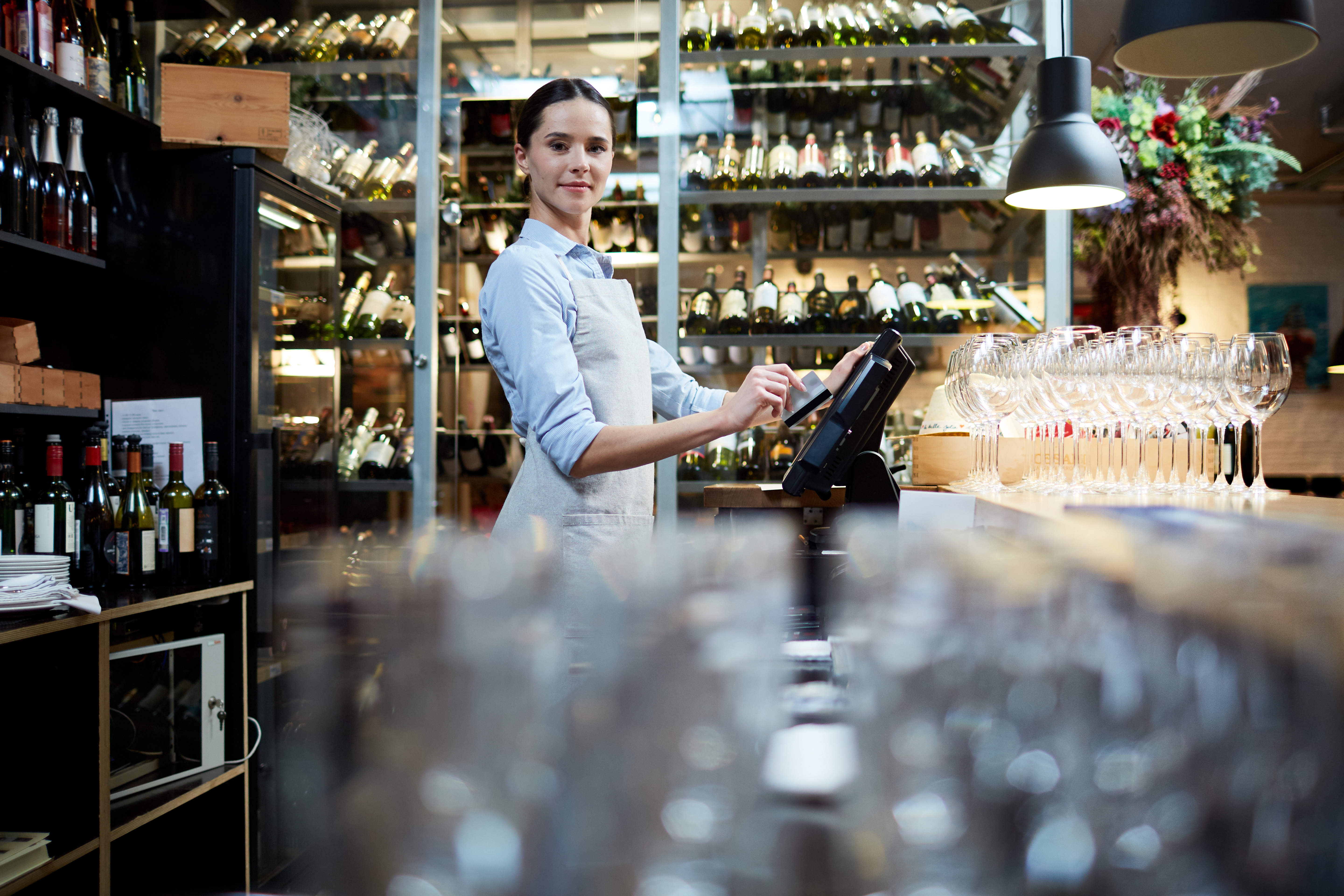
The Liquor Logic POS interface is designed for speed and clarity. Staff can open a tab, add items, apply discounts, split a bill, and process payment in under 30 seconds — even during the busiest service. The product grid is fully customisable with your own categories and pricing so new staff can be operational within minutes.
Every transaction is immediately synced with your back-end inventory, financial dashboards, and production records. There's no end-of-day reconciliation to run, no manual stock count to trigger — your data is always up to date.
The system runs on any modern tablet, desktop, or touch screen — no proprietary hardware lock-in. Use it on an iPad behind the tasting counter, a wall-mounted screen at the bar, or a desktop at your retail counter. Hardware recommendations are available on our Hardware page.

Design Your Space. Manage It Live.
Liquor Logic's drag-and-drop floor plan builder lets you recreate your restaurant, tasting room, or bar layout exactly as it exists in reality. Place tables, label sections, designate indoor and outdoor areas, and define seating capacities — all without any technical knowledge.
Once your floor plan is live, your front-of-house team sees the same view on their device. Tables are colour-coded by status — available, or occupied — so your team always knows where to seat the next group and which tables need attention.
Orders are assigned directly to tables from the floor plan view. When a customer moves tables, their order moves with them. When a table pays and is cleared, it resets to available instantly. No verbal handovers, no lost orders, no confusion.
- Drag-and-drop layout builder — design your space in minutes
- Live table status — available, occupied, or needs attention at a glance
- Multiple rooms and sections — indoor, outdoor, bar, private dining
- Order-to-table assignment — orders travel with the customer
- Seating capacity management — never over-seat a section
- Staff section assignment — allocate waitrons to specific zones
Accept Any Payment. Bill Any Way Your Customer Wants.
No two tables close out the same way. Liquor Logic's billing system is flexible enough to handle any scenario — from a quick single payment to a large group that wants to split twelve ways.
Cash
Fast cash processing with change calculation. Till float management and cash-up reports at end of shift.
Card Payments
Log card payments against transactions for accurate reconciliation.
Zapper & SnapScan
QR code payments via Zapper and SnapScan — contactless, fast, and reconciled automatically.
Charge to Tab
Open, manage, and easily charge orders directly to a customer's active tab for a fast and seamless checkout experience.
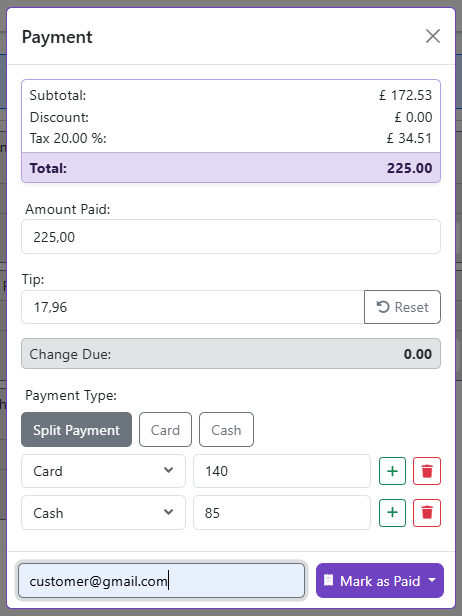
Split Billing — Any Way You Like
Large groups mean complicated billing. Liquor Logic handles any split scenario without confusion or manual calculation.
- Split by item — each person pays for exactly what they ordered
- Split equally — total divided by number of people
- Split by custom amount — each person pays a specified amount
- Mixed payment types — half cash, half card on the same table
- Partial payment — someone leaves early and pays their portion
Discounts, Comps & Promotions
Flexible discount management for every situation — without bypassing your controls.
- Percentage discounts — by item or total bill
- Fixed amount discounts — loyalty rewards or vouchers
- Complimentary items — log comps with reason for audit trail
- Staff discounts — role-based discount permissions
- Loyalty Membership pricing — automatic pricing tiers by customer group
Orders Flow From Table to Kitchen Without a Single Word Spoken
Paper dockets get lost. Shouted orders get misheard. Liquor Logic's kitchen printing and order management system eliminates both. When a waitron submits an order from the floor plan, it prints immediately at the relevant kitchen station — hot food to the kitchen, cold drinks to the bar — with the table number, course, and any special instructions clearly laid out.
Course management lets your front-of-house team control the pace of a meal. Fire starters when the customer is ready, hold mains until the starter plates are cleared, and send dessert orders with perfect timing. Your kitchen always knows exactly what to prepare and when.
The order screen gives staff a live view of every open order on the floor — what's been placed, what's been sent to the kitchen, what's been served, and what's still outstanding. Nothing is forgotten, nothing is duplicated.
Kitchen Ticket Printing
Orders print automatically at designated printers by category — food to the kitchen, beverages to the bar — the moment they're submitted.
Kitchen Display (KDS)
Go completely paperless. Route orders directly to kitchen monitor screens, tracking preparation times and order status in real-time.
Item Modifiers & Notes
Add modifiers (no onion, extra sauce, medium-rare) to any item. Instructions print exactly as entered on the kitchen ticket.
Voids & Refunds
Void items or process refunds with manager authorisation. Every void is logged with a reason for accountability and stock reconciliation.
Every Sale Instantly Updates Your Stock — Zero Manual Effort
The moment a POS sale is completed, your inventory is updated. Not at end of day. Not after a manual sync. Immediately. If a customer at the tasting counter buys the last bottle of your reserve single malt, that stock is gone from your inventory the second the transaction closes — and if that product has a reorder point set, the alert fires instantly.
This live connection between POS and inventory means your purchasing decisions are always based on real data. You never run out of your best sellers unexpectedly, and you never over-order product that's already overstocked.
For producers with multiple sales channels — tasting room POS, online store, wholesale orders — all stock movements from all channels flow into the same inventory pool. No more managing separate stock counts per channel and hoping they add up at month end.
- Instant inventory deduction on every completed sale
- Automatic reorder alerts when stock hits minimum levels
- Unified stock pool across POS, online, and wholesale channels
- Ingredient-level deduction for menu items with recipe linkage
- Batch-traceable stock — sold units are linked back to the production batch
- End-of-day stock variance reports — compare actual vs theoretical usage
Know Exactly What's Selling, When, and to Whom
POS data without analysis is just noise. Liquor Logic turns every transaction into insight — helping you make better decisions about your menu, your pricing, your staffing, and your production planning.
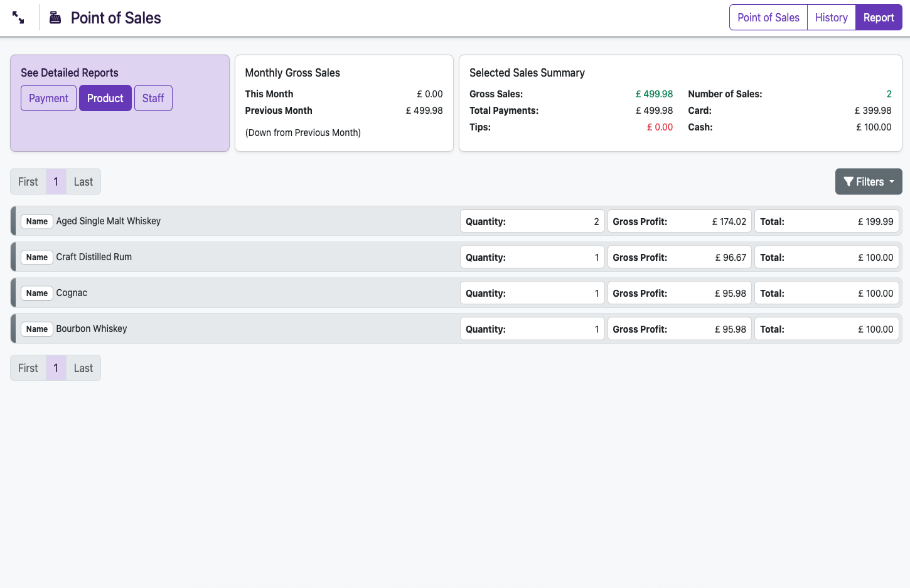
Sales by Product
See exactly which products are driving revenue and which are underperforming. Filter by day, week, month, or custom date range. Export to Excel for deeper analysis.
Sales by Time of Day
Identify your peak trading hours and quietest periods. Use this data to optimise your staffing roster and plan your production schedule around actual demand.
Sales by Staff Member
Track individual staff performance — average transaction value, items sold, and upsell rate. Identify your top performers and coach those who need support.
Discount & Comp Analysis
Monitor exactly how much revenue is being discounted or comped, by whom, and for what reason. Flag unusual patterns.
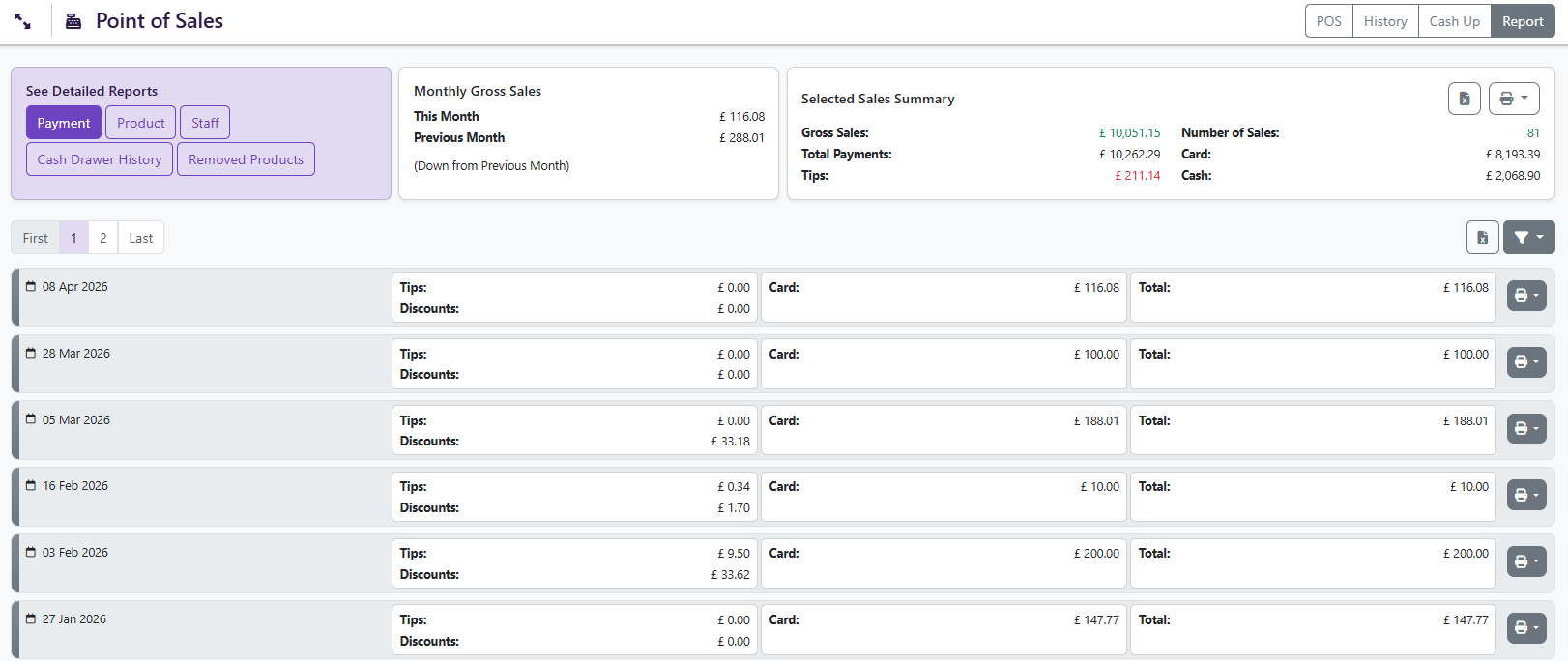
Till & Cash-Up Reports
End-of-shift cash-up with expected vs actual cash, card totals, Zapper and SnapScan totals, and full variance reporting. No manual counting sheets required.
Top Products Dashboard
At-a-glance dashboard showing your top 10 selling products by revenue and volume. Use this to make menu decisions and inform production planning for next quarter.
Works on Any Device — No Proprietary Hardware Required
Unlike some POS systems that lock you into expensive proprietary hardware, Liquor Logic runs on any modern browser-capable device. Use what you already have, or choose from our recommended hardware list for an optimised setup.
Frequently Asked Questions — POS
Explore Other Features
See the POS in Action
Book a personalised demo and we'll walk you through the POS in the context of your specific venue setup — tasting room, restaurant, retail, or all three.